

It’s no secret that one of the best ways to stick to a savings habit is to make it automatic.
Better yet is to set your savings aside as soon as you get paid, so you’re less tempted to splurge on that designer coat/new hoover/Ibiza holiday you’ve been eyeing up forever. After all, out of sight, out of mind, right?
Enter Hnry Allocations – the hands-down easiest way for freelancers to automate their savings and investments. It’s a simple system that automatically sends a percentage of every payment to a separate account of your choosing.
You can use Allocations to hit a savings goal, invest regularly, set money aside for retirement, top up your Hnry Account, donate to charity, and more. You also have the flexibility to create an Allocation that only applies to payments from certain clients, and you can turn any Allocation off whenever you like. Basically, you’re always in control of how much you’re setting aside.
The best part? Hnry Allocations squirrels your savings away before any client payments hit your personal bank account, meaning everything you receive is yours to spend.
(So go on – treat yourself!)
Whether you’re looking to save an emergency fund, grow your wealth, prep for retirement, or treat your mum to a weekly bar of Cadbury Fruit & Nut, Allocations can help you hit your financial goals. Sweet!

An overview of Hnry Allocations
Hnry Allocations is a simple, strategic way to automate your saving/investing habits. Once you set up an Allocation, it whirs away in the background, making sure you’re always putting money aside for the things you care about most.
We know freelancers often have variable income, which is why we designed Allocations to work on a percentage basis. Instead of a set amount, Allocations set aside a percentage of each pay, so you’re never left with less than you need.
To make it as easy as possible, Allocation percentages are calculated on gross income, meaning they’re a percentage of your full pay. But they still count as part of your taxable income – you’ll still pay tax on any and all Allocation funds. The maximum percentage you can nominate for Allocations combined is 45% (calculated pre tax), which makes sure there’s enough left over for the Hnry system to put towards all your tax bits and bobs.
There’s no limit to the number of Allocations you can set up (so long as you don’t exceed the 45% limit). You can also cap the amount you send to an individual Allocation weekly, monthly, or in total – extra useful when it comes to recurring bills or debt repayments!
To help her reach her goals, she's set up four different Hnry Allocations:
- 5% of each payment to her emergency savings account
- 5% of each payment to her investments platform
- 5% of each payment to her private pension (gotta save for retirement too!)
- Total: 15%</p>
Creating a new Allocation
Creating an Allocation is super simple – and once it’s set up, you’re good to go!
Start by navigating to the Allocations tab in the main menu.
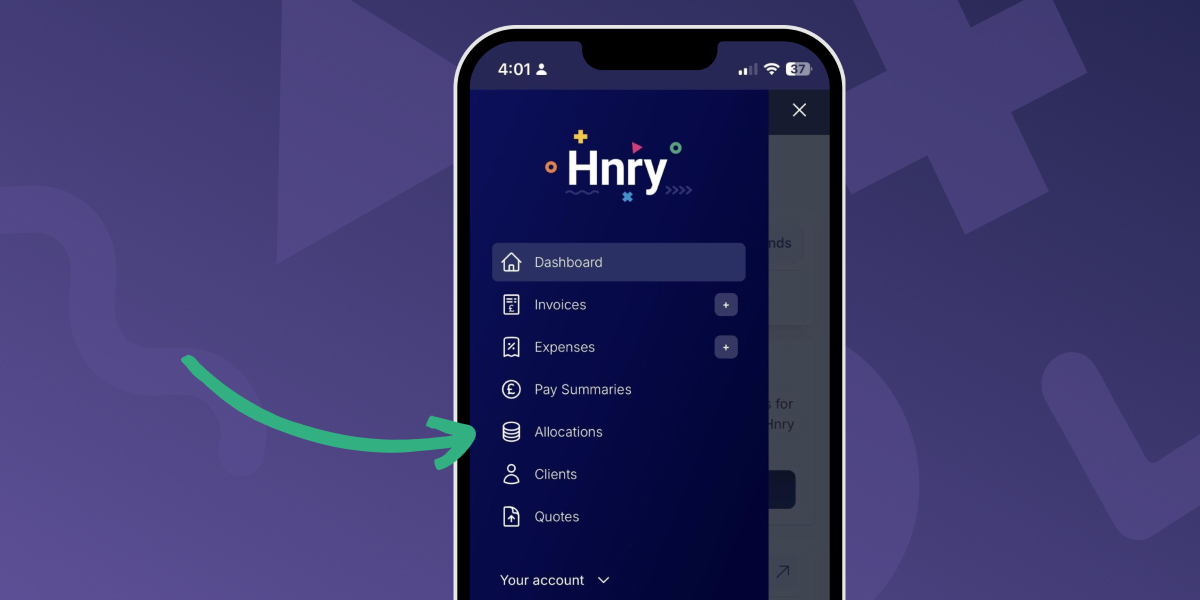
Once there, you’ll have a choice of four different options:
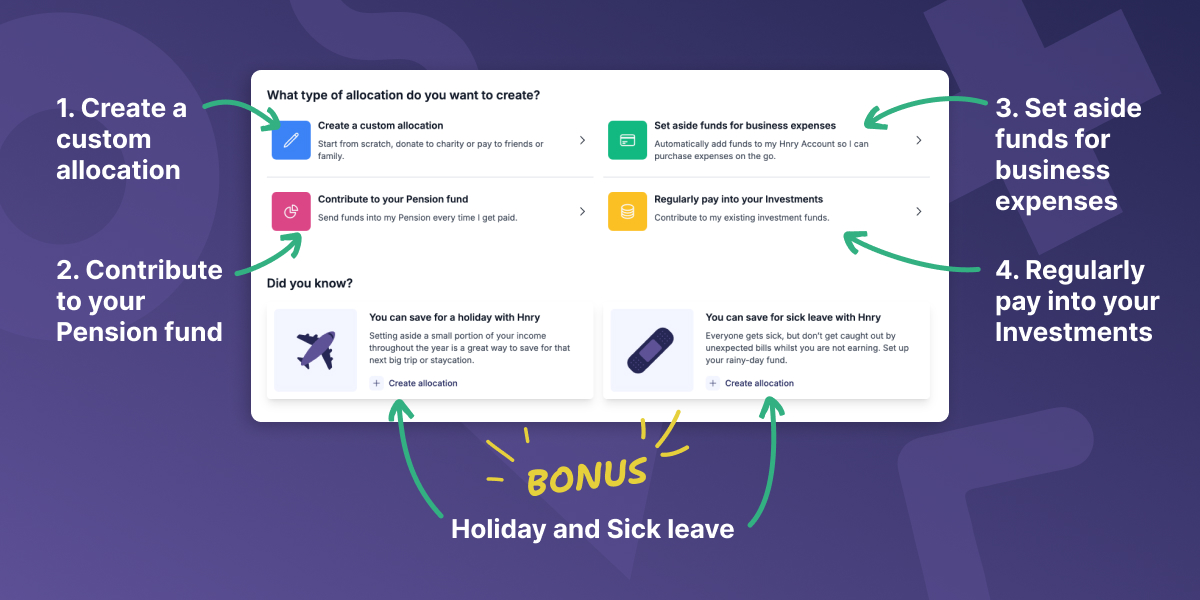
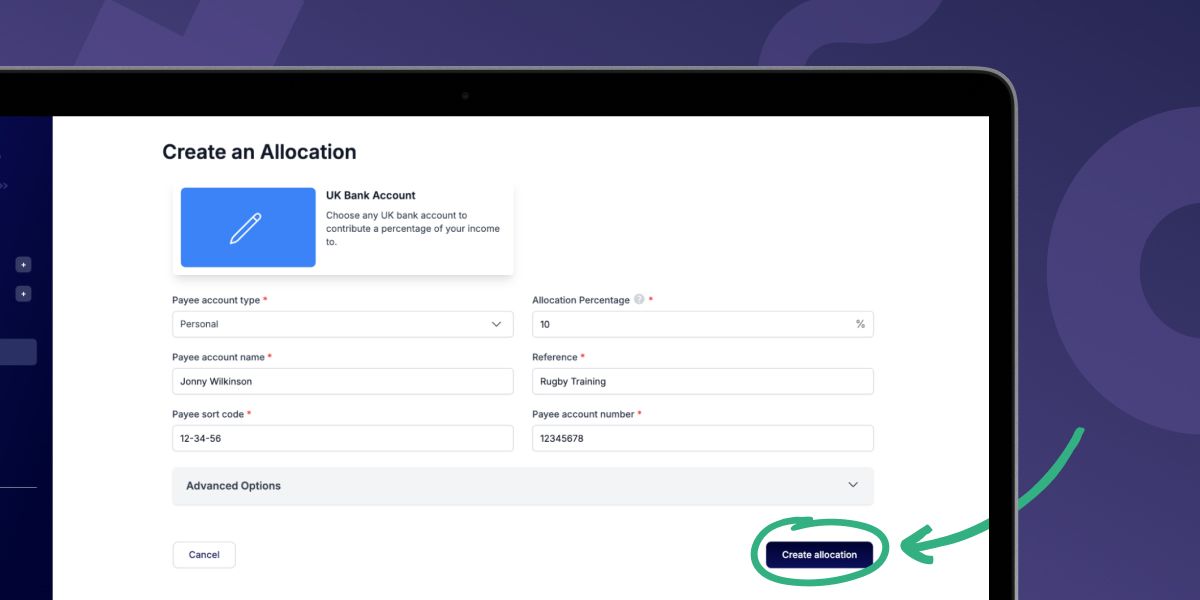
Create a custom allocation
This template allows you to send money to any UK bank account.
You’ll need:
- the payee’s account type (whether business or personal)
- their account name, sort code, and account number
- any reference you’d like to include (like with a normal bank transfer)
- your allocation percentage.
Once you’ve added all those details, you can go ahead and hit the “Create allocation” button at the bottom of the screen. That’s it! You’re done!
Contribute to your Pension fund
This option does what it says on the tin: it lets you create an Allocation to send funds directly to your private pension.
Hnry Allocations already has Allocation templates for a few of the major private pension providers – all you need is the relevant identifying details (like your account or plan number) and the percentage you’d like to allocate:
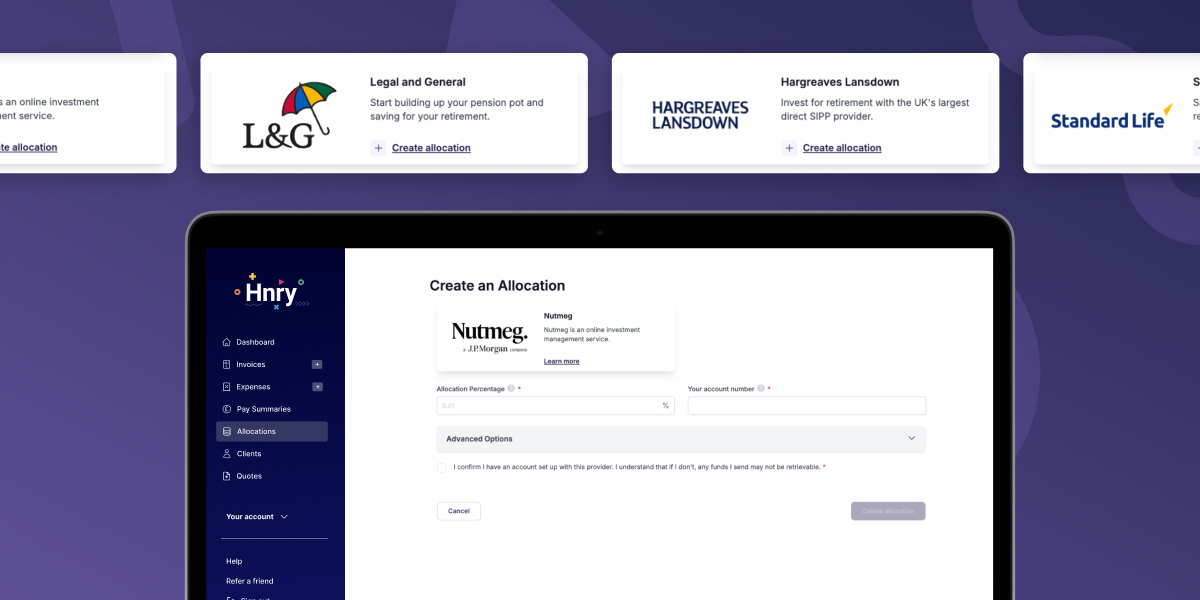
💡 If the provider you’re looking for isn’t listed, you can create a custom Allocation (like we just talked about) and enter their details manually.
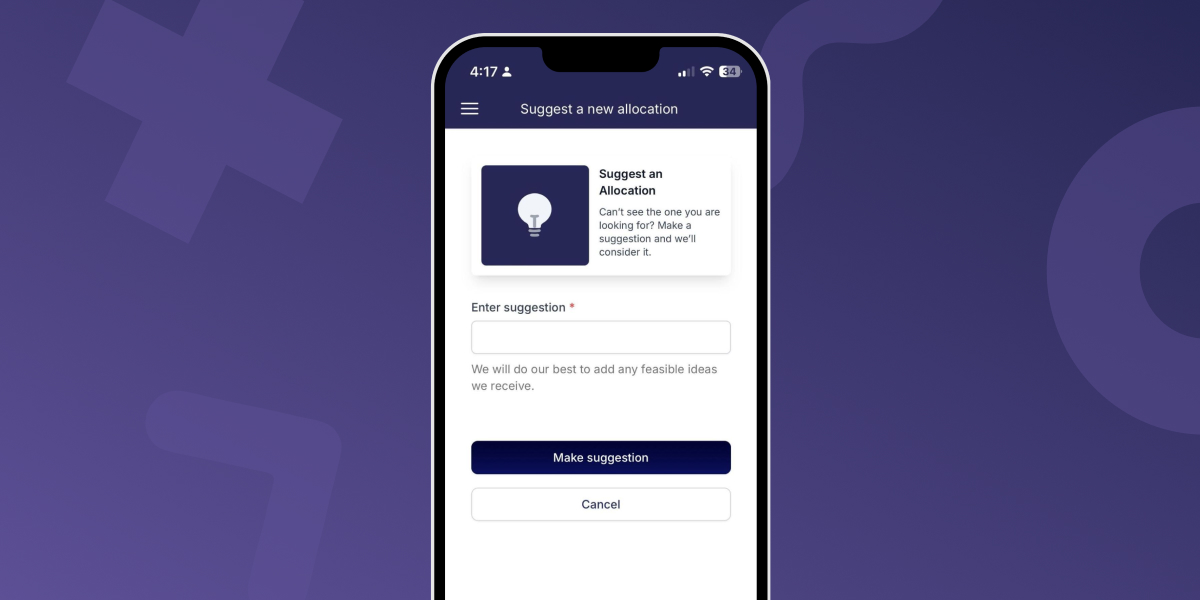
💡 You can also submit a suggestion for us to include your provider as a template in the future!
Set aside funds for business expenses
We might be biased, but we reckon using a Hnry Business Mastercard is the easiest way to stay on top of claiming allowable expenses.
Every time you use your card to purchase a business expense, a new expense is raised in the Hnry app under the “Expenses” tab. Once you upload your purchase receipt and add a few details, the expense will be managed and claimed as per usual. Easy!
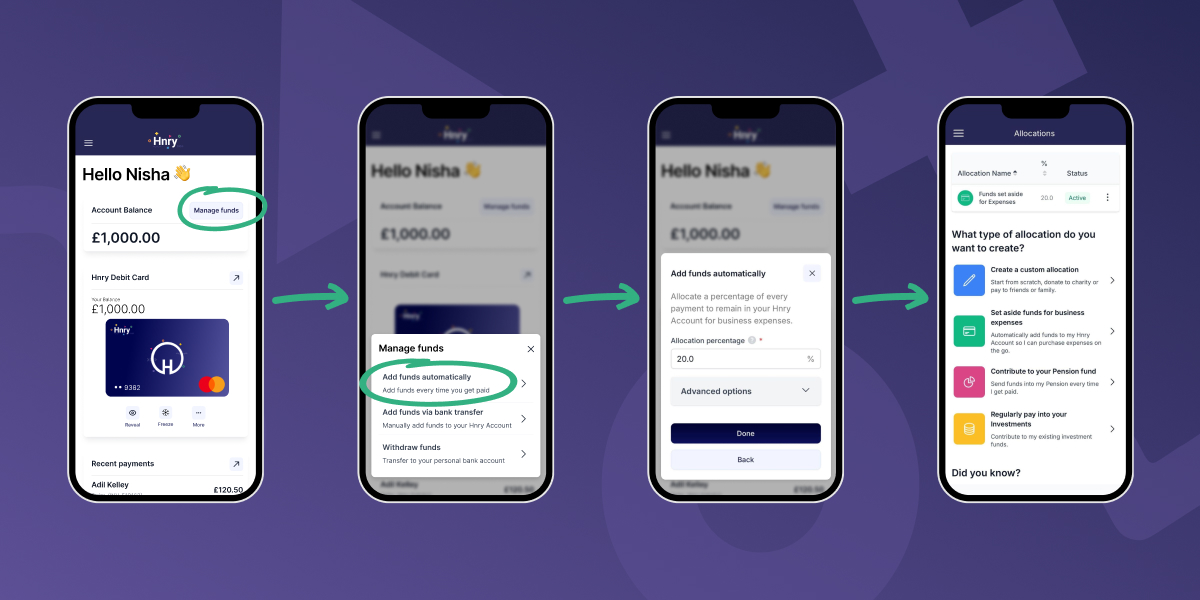
An Allocation is the easiest way to make sure your Hnry Account is always topped up for your business expenses.
To create an Allocation, tap the “manage funds” button on the Hnry Dashboard. Select “Add funds automatically” and enter the percentage of each payment you want to add.
For example, if you enter 5%, we will automatically retain 5% of each payment you receive through your Hnry Account for your business expenses.
Sorted!
Regularly pay into your investments
Whether you’re investing in a stock that’s going to the moon, or you’re building a long-term balanced portfolio, Hnry Allocations has you covered.
Like with pension providers, we’re aiming to have templates available for some of the more common investment platforms. Let us know what investment platform you’d like to see included!
Bonus: Holidays and sick leave
If you haven’t already, it’s always a good idea to set something aside for a rainy (or beach getaway) day!
Our holiday and sick pay shortcuts are for creating a custom Allocations to any UK bank account.
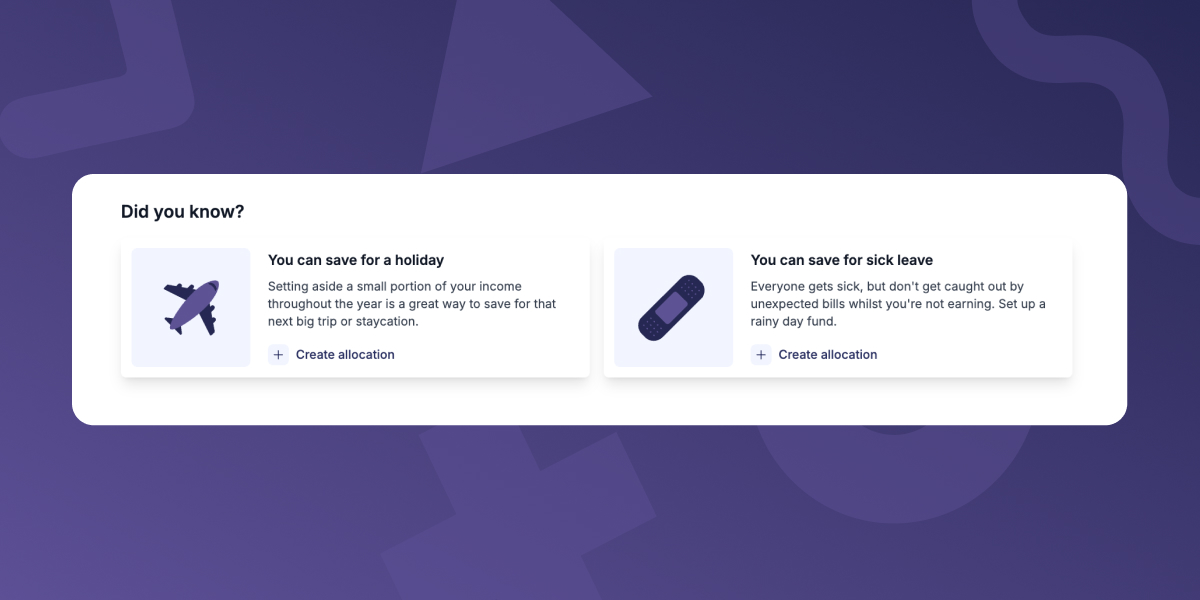
Setting aside funds now for a future getaway or unexpected sick leave gives you the peace of mind you deserve. If money is tight right now (we hear you), you could always set up an Allocation for 0.01% – the minimum required.
Even small steps can pay dividends down the line!
Managing your Allocations
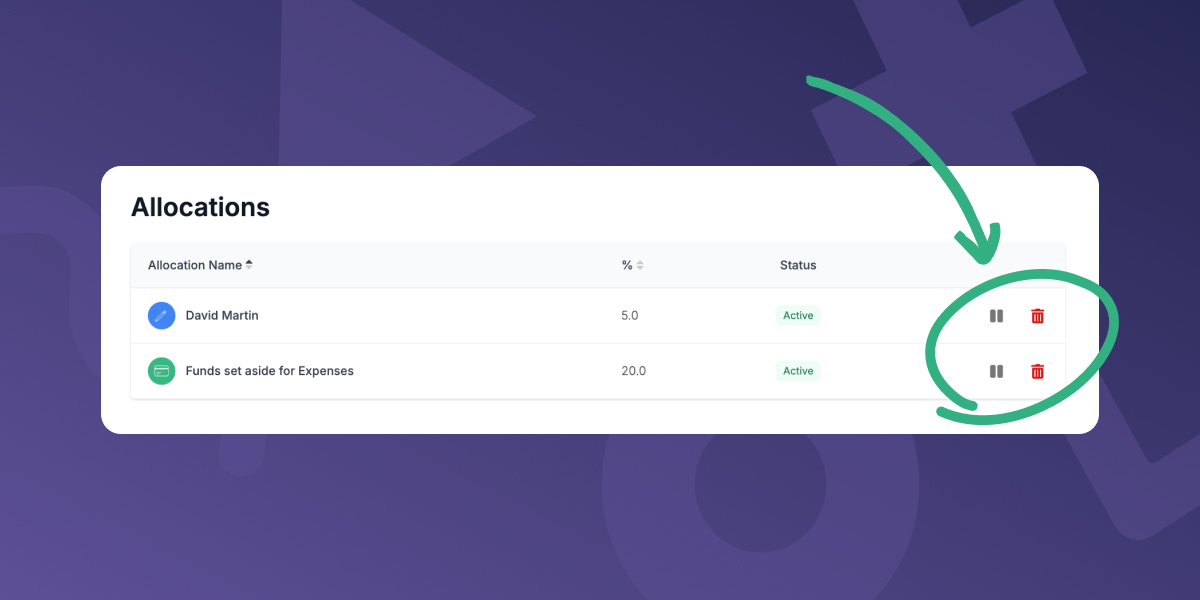
Once created, your Allocations will be listed at the top of the Allocations page.
From here it’s super easy to pause or delete an Allocation – simply click the pause or delete button for the relevant Allocation.
Advanced options
All Allocations, whether custom or through a template, have the same advanced options available.
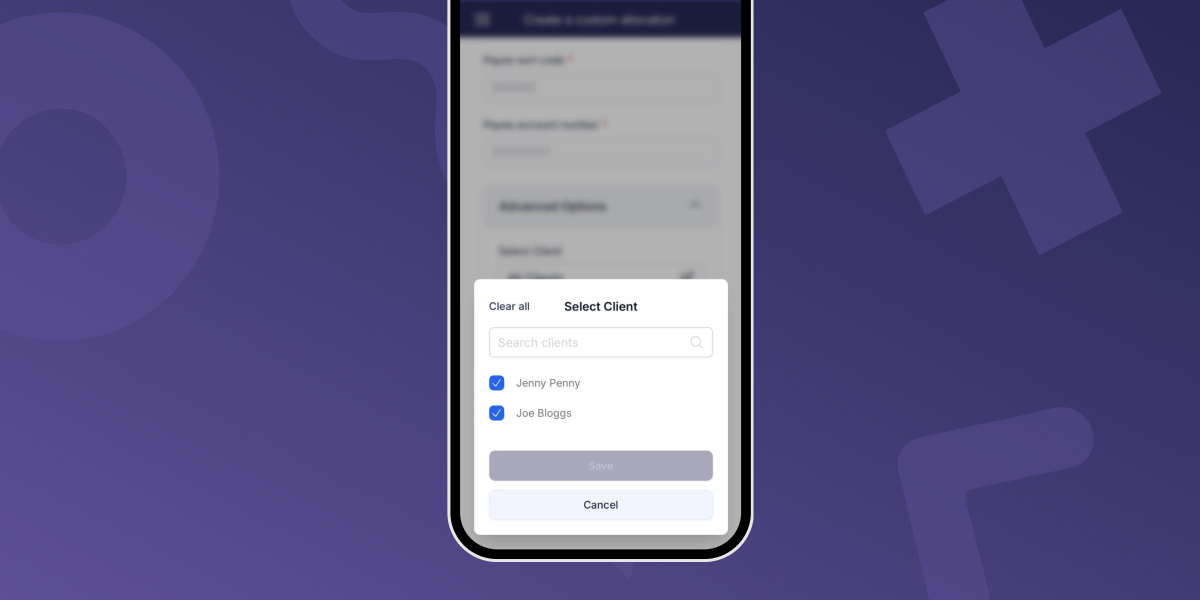
Under the “Advanced Options” dropdown, you’ll be able to customise which clients an Allocation applies to.
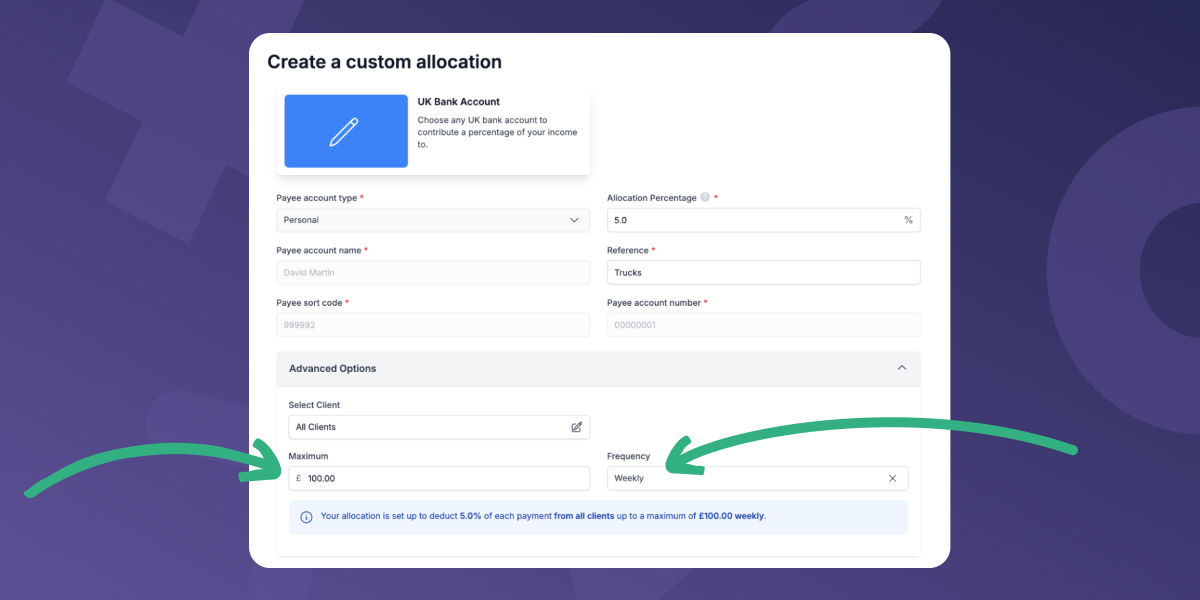
You’ll also be able to set a maximum amount to be set aside either weekly, monthly, or in total. The Allocation will pause once it hits the maximum amount for the specified period.
Turning Allocations off for individual invoices
You can turn Allocations off for individual invoices. This is super useful when you’ve earmarked the payment from a job for something specific (like that aforementioned monster truck. Hey, we can dream!).
💡 You’ll need to turn off an allocation for an invoice before you send it. Otherwise you’ll have to edit the invoice and resend it to your client, which isn’t ideal!
While your Hnry Invoice is in draft form, click on the “Manage allocations” dropdown. From there, you’ll be able to toggle off any allocation that applies to this client:
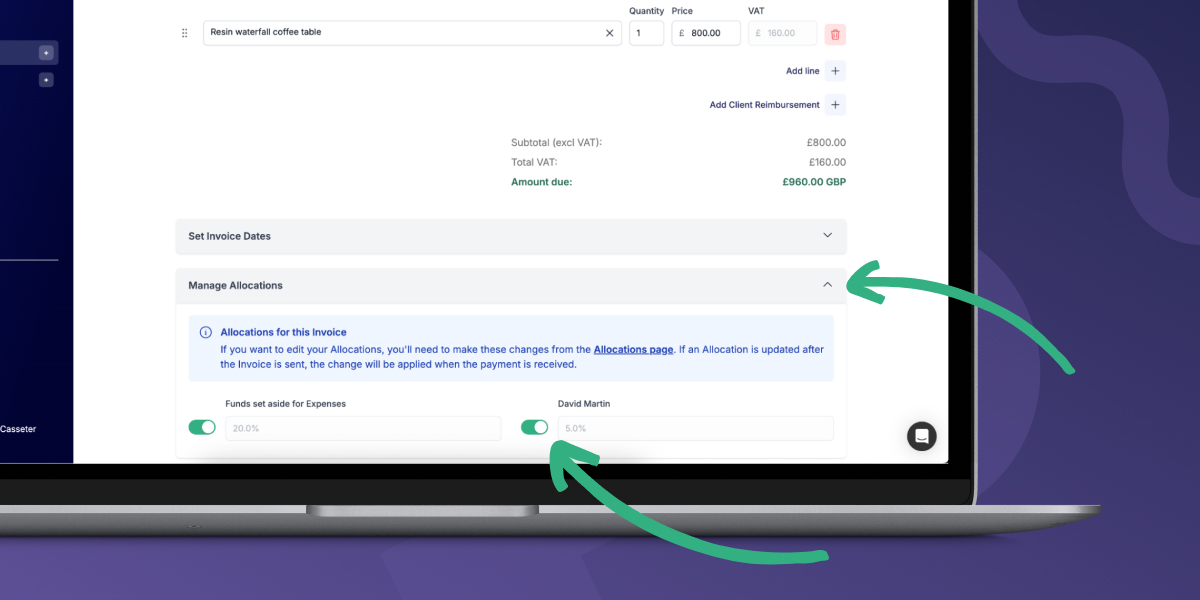
After delivering a truckload of roses, tulips, orchids, and hydrangeas to the wedding venue, Jamie sits down to create and schedule her Hnry Invoice. Under the “Manage Allocations” dropdown, she toggles off all her Allocations (except for the 5% contribution to her private pension. Saving for retirement is important!).
When her invoice is paid, all Jamie’s post-tax income goes directly to her spending account. She has enough for flights to Barca, and a little leftover for a Lego plum blossom she’s had her eye on forever.
For Jamie, it’s the perfect way to celebrate financial success.

Hnry makes life easier for sole traders
We may be biased, but we really believe that the best way for sole traders to stay on top of their finances – and their goals – is to use Hnry.
Hnry is an award-winning tax and financial administration service for sole traders. For just 1% +VAT of your self-employed income (capped at £600 +VAT a year), Hnry calculates and pays all your taxes and contributions automatically – so you never have to think about it.
With features like Allocations, you can go beyond tax and start automating your savings and investments. Whether you’re setting money aside for your next holiday, topping up your private pension, or building that emergency fund, Hnry makes it effortless.
We’ll also complete and file your Self Assessment tax return, VAT returns (if you’re registered), and manage your expenses – all as part of the service.
Start using Hnry today and let automation do the heavy lifting, so you can focus on the things you care about most (like the actual job).